What is remote access permission for MySQL and MSSQL?
MySQL database connections are typically used in two ways:
1. localhost
The website application and the database run on the same server, and the connection is established through this server.
2. Server-to-server
The website application connects to a database server on the same or a different network.
In some cases, you may need to connect to the database from an external network. This type of connection is called remote access.
For example: accessing the server database from your computer, performing database backups, etc.
Many hosting providers block external (remote) database connections by default for security reasons. Therefore, to connect to a database from your home or current network, you must grant remote access permission to your own IP address.
This article will explain step-by-step how to grant remote access permission to your IP address via cPanel.
Allowing Remote MySQL Connections in cPanel
1- Log in to cPanel:
2- Access Remote Database Access:
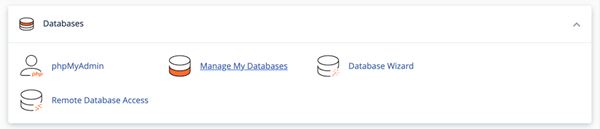
Go to the "Databases" section. As shown in the screenshot below, find and click on Remote Database Access.
3- Add Your IP Address
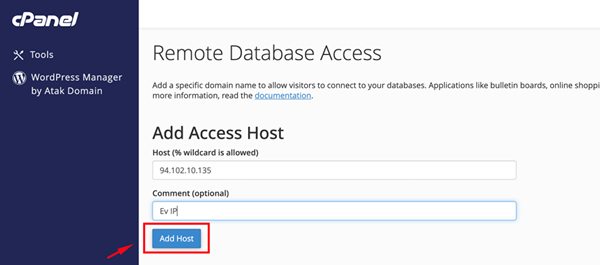
Enter your IP address and comment (optional), then click the Add Host button.
Important Note:
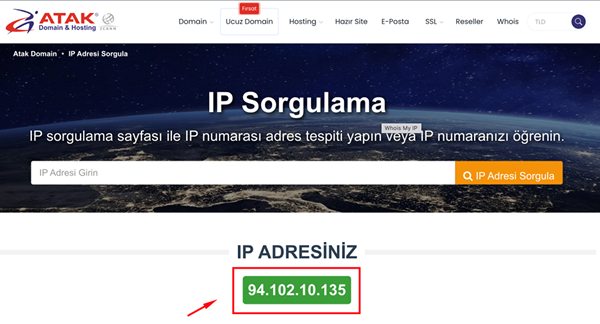
If you do not know your IP address, you can check it via the following link: IP address lookup tool
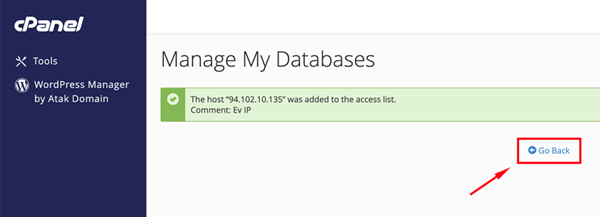
- Once you've added the IP address, click the Go Back button to return to the previous page.
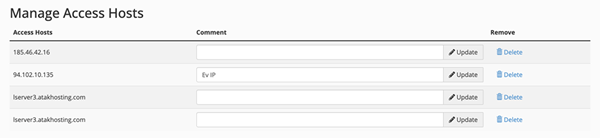
- At the bottom of the Remote Database Access page, under “Manage Access Hosts,” you can see a list of permissions you have granted. From here, you can edit or delete these permissions.
Allowing Remote MsSQL Connections
All hosting packages offered by Atak Domain come with remote MsSQL access enabled by default.

Author Atak Domain
Domain, hosting, email and SSL provider since 2003 and an ICANN-accredited registrar since 2011 (IANA ID 1601). This article was written by the Atak Domain team.