

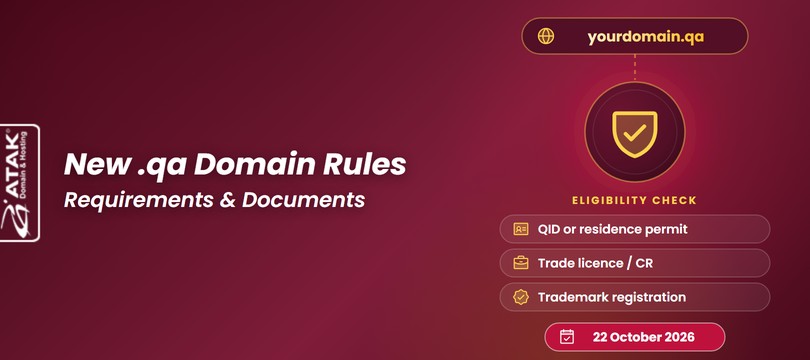
.qa Domain Rules Are Changing: Qatar’s New Registration Requirements and Documents
21.10.2026
When you decide to launch a website, the first thing that usually comes to mind is the domain name — but registering a domain is only half the job. Your website's files, images, and database need to be stored on an internet-connected server, somewhere they can be served to the rest of the world. That place is web hosting.

In this guide, you'll learn:
Find the right hosting plan for your site.
Compare Starter, Expert, Expert Plus, and Expert Deluxe based on your website type.
Web hosting is a service that stores a website's files, images, databases, and email data on a server connected to the internet, keeping the site consistently accessible to visitors. Here's a simple way to think about it: your domain is your site's address, and hosting is the building that address points to. Without a domain, visitors can't find you; without hosting, there's nothing for them to see once they arrive.
If you're just starting out, standard shared web hosting is usually enough. Running WordPress? Go with WordPress Hosting. Building a company site? Business / Corporate Hosting. Selling online? E-commerce hosting with strong resources and SSL included. Managing multiple client sites? Reseller Hosting. Running a custom app in Node.js, Python, or ASP.NET? Pick hosting built for that stack. Expecting heavy traffic? Look at Expert Deluxe or Managed Hosting.

When a visitor types your address into a browser, a short chain of events happens behind the scenes:
| Step | What Happens |
|---|---|
| 1. The domain is typed in | A visitor enters yoursite.com into their browser |
| 2. A DNS lookup runs | DNS resolves the domain to the server where the site lives |
| 3. The request reaches the server | The browser connects to your hosting server |
| 4. Files are sent back | The server returns your site's files (HTML, images, database content) to the browser |
| 5. The page loads | The website loads in the visitor's browser |
If any link in that chain is weak — a slow server, a misconfigured DNS record, an under-resourced hosting plan — the result is a slow-loading or unreachable site.
Here are the five concepts beginners mix up most often, side by side:
| Concept | What It Does |
|---|---|
| Domain | Your website's address on the internet (example: atakdomain.com) |
| Hosting | The server space where your site's files, database, and email live |
| DNS | The system that points your domain to the right hosting server |
| SSL | The security certificate that encrypts the connection between visitor and server |
| Website | The actual content visitors see — pages, images, text |

Hosting is more than just storage space — it directly shapes your site's speed, security, email setup, and how reliably visitors can reach you.
Hosting affects SEO indirectly through speed, uptime, and user experience. A slow or unstable server can make pages load slowly or become temporarily unavailable, which can hurt visitor engagement and, over time, search visibility.

Here's a clear, side-by-side breakdown of the most commonly searched hosting types.
A hosting model where one server's resources (CPU, RAM, disk) are split across multiple websites — the most common and most affordable type.
Best for: personal blogs, small business sites, first-time website owners.
Advantage: low cost, easy to manage without technical skills.
Skip it if: you're running a high-traffic or resource-heavy project (video, lots of concurrent users).
Budget-focused hosting plans designed to get a new project online without a big upfront cost.
Best for: students, hobby projects, and anyone launching on a tight budget.
Advantage: the lowest entry price point, while still running on the same core infrastructure.
Skip it if: you need higher resources from day one — compare specs carefully against Expert or Expert Plus.
Hosting specifically tuned for sites built on WordPress.
Best for: anyone running a WordPress site.
Advantage: LiteSpeed caching and WordPress-specific tuning for faster page loads.
Skip it if: your site doesn't run WordPress — you'd be paying for optimization you can't use.
Browse WordPress Hosting plans
Business Hosting, also referred to as Corporate Hosting, is built for companies that need higher resources, more email capacity, and priority support.
Best for: companies, corporate websites, anyone needing more email capacity.
Advantage: dedicated CPU/RAM resources and priority support.
Skip it if: you just need a single simple landing page — you'd likely be over-resourced.
Corporate Hosting is one of Atak Domain's standard plan categories; you can compare it alongside other plans on the main hosting page.
Browse Business / Corporate Hosting plans
Hosting that runs on the Linux operating system (distributions like Ubuntu, CentOS, Debian) — the most widely used hosting OS in the world.
Best for: anyone running PHP, MySQL, WordPress, or Joomla.
Advantage: no licensing cost, which keeps it more affordable than the alternative.
Skip it if: your site specifically requires ASP.NET or MSSQL.
Hosting optimized for projects built on Microsoft technologies (ASP.NET, .NET Core, MSSQL).
Best for: enterprise applications using ASP.NET or an MSSQL database.
Advantage: full compatibility with Microsoft-based software.
Skip it if: your site runs WordPress or another PHP-based system — Linux hosting will be more cost-effective.
See Windows Hosting on the main hosting page
Hosting that comes with cPanel, the world's most widely used hosting control panel.
Best for: anyone with limited technical experience who wants to manage their own site.
Advantage: one-click app installs, a file manager, and email management all in one screen.
Skip it if: you need a highly customized server configuration cPanel doesn't support.
An alternative control panel to cPanel that can run on both Linux and Windows servers.
Best for: anyone managing both Linux- and Windows-based projects from one panel.
Advantage: works across operating systems.
Skip it if: you're already comfortable with cPanel — switching panels has a learning curve.
Linux-based hosting optimized for sites built on the Joomla content management system.
Best for: corporate and community sites built on Joomla.
Advantage: one-click setup tuned to Joomla's requirements.
Skip it if: you're not running Joomla — a general Linux hosting plan will do.
VPS (Virtual Private Server) and VDS (Virtual Dedicated Server) both split a physical server into virtual sections, giving each user their own dedicated CPU, RAM, and disk resources. On a VDS, those resources are allocated more strictly and predictably, which is why VDS plans usually cost a bit more than VPS and deliver more consistent performance.
Best for: mid-to-high traffic projects that have outgrown shared hosting's resources.
Advantage: dedicated resources, independent of other users on the server.
Skip it if: you're just starting out with a low-to-moderate traffic site — it's more cost and technical responsibility than you need yet.
Atak Domain's plan lineup already covers most of what would otherwise require a VPS or VDS: Expert Plus and Expert Deluxe include high-resource website hosting, strong CPU options, generous SSD space, and high traffic capacity. If you need genuinely higher traffic capacity or a fully isolated server, Expert Deluxe is the highest-resource plan in the current lineup, or you can reach out to support to discuss your specific needs.
A hosting model where you purchase hosting resources and resell them, under your own brand, to your own clients.
Best for: freelancers, web design agencies, anyone managing multiple client sites.
Advantage: sell hosting under your own brand without running your own infrastructure.
Skip it if: you only manage a single site — you don't need this model.
Atak Domain's Reseller Hosting is fully white-label and integrates with WHMCS, WiseCP, HostBill, and Blesta, and is also built to work seamlessly with the Domain Name API infrastructure — a real advantage if you're already a domain reseller too.
Hosting optimized for running server-side JavaScript applications.
Best for: developers building Node.js-based APIs and modern web apps.
Advantage: comes with the tooling and configuration Node.js apps need, ready to go.
Skip it if: you're running a standard PHP/WordPress site — you don't need this.
Hosting optimized for server-side applications written in Python.
Best for: developers building Python/Django-based projects.
Advantage: one-click Python application setup.
Skip it if: your project doesn't use Python.
Hosting built around the resources, security, and uptime online stores need.
Best for: online stores running WooCommerce, OpenCart, and similar platforms.
Advantage: resource capacity built to handle traffic spikes during sales, with SSL included.
Skip it if: your site has no commercial transactions — it's more capacity than you need.
Browse E-commerce Hosting plans
Hosting where server management, security, and maintenance are handled by the provider's team.
Best for: anyone without technical experience, or who'd rather not spend time on server admin.
Advantage: you focus on your business; server management is handled for you.
Skip it if: you want full hands-on control of your server configuration.
Hosting where limits on disk space, traffic, or number of sites are largely lifted, designed for growing projects.
Best for: anyone managing multiple sites or expecting significant growth.
Advantage: you don't have to closely monitor resource caps as you scale.
Skip it if: you only run one small site — you likely won't need this much headroom.
Note: “unlimited” claims are generally subject to a fair-use policy. Always check the current plan terms before purchasing.
Browse Unlimited Hosting plans
Atak Domain's free hosting offer is a full-featured, 3-month trial for customers who haven't purchased hosting from Atak Domain before — it runs on the same infrastructure as the paid plans (SSD storage, Imunify360 security, cPanel/Plesk), not a stripped-down tier.
Best for: testing an idea risk-free, or trying the platform before committing.
Advantage: no upfront cost for the trial period, with real production-grade features.
Skip it if: you're launching a serious brand or store from day one and want a plan with no expiration built in from the start.
| Hosting Type | Best For | Advantage | Watch Out For |
|---|---|---|---|
| Shared / Web Hosting | Beginners, blogs | Low cost, easy to manage | Limited resources at high traffic |
| Cheap Hosting | Budget-conscious beginners | Lowest entry price | Compare specs before committing |
| WordPress Hosting | WordPress site owners | WordPress-specific optimization | Unnecessary for non-WordPress sites |
| Business / Corporate Hosting | Companies, corporate sites | High resources + business email | More than simple sites need |
| Linux Hosting | PHP/MySQL users | Affordable, no license cost | Incompatible with Windows-only software |
| Windows Hosting | ASP.NET / MSSQL projects | Full Microsoft compatibility | Unnecessary cost for PHP sites |
| Joomla Hosting | Joomla site owners | Joomla-tuned setup | Unneeded outside Joomla projects |
| VPS / VDS Hosting | Mid-to-high traffic projects | Dedicated, isolated resources | More technical responsibility for beginners |
| Reseller Hosting | Agencies, freelancers | Sell hosting under your own brand | Unneeded if you manage one site |
| Node.js / Python Hosting | Developers | Stack-specific environment | Unneeded for classic CMS sites |
| E-commerce Hosting | Online stores | Resilient to traffic spikes | More than non-commercial sites need |
| Managed Hosting | Non-technical users | Server management handled for you | Limits full control for power users |
| Unlimited Hosting | Growing, multi-site owners | Generous resource ceilings | Possibly unnecessary for one small site |
| Free Hosting (3-month trial) | First-time testers | No upfront cost, full feature set | Time-limited, new customers only |
Answer these for yourself, and see which hosting type fits:
| Question | If “Yes,” Go With |
|---|---|
| Is this your first website? | Web Hosting (Starter) |
| Will you be using WordPress? | WordPress Hosting |
| Is it a company website? | Business / Corporate Hosting |
| Will you sell online? | E-commerce Hosting |
| Will you manage more than one site? | Expert Plus or Reseller Hosting |
| Are you using a specific stack (Node.js, Python, ASP.NET)? | Node.js / Python / Windows Hosting |
| Expecting high traffic? | Expert Deluxe or Managed Hosting |
| Plan | Best For | Typical Use Case |
|---|---|---|
| Starter | First-time website owners | Entry-level blogs and landing pages |
| Expert | Small businesses | Sites that need more resources than Starter offers |
| Expert Plus | Agencies, multi-site owners | Several sites and growing projects |
| Expert Deluxe | E-commerce and high-traffic sites | Projects with high resource needs |
You can compare current plan prices and specs on our hosting prices page.
| Site Type | Recommended Hosting |
|---|---|
| Personal blog | Web Hosting (Starter/Expert) |
| Corporate site | Business / Corporate Hosting |
| WordPress site | WordPress Hosting |
| Joomla site | Joomla Hosting |
| E-commerce store | E-commerce Hosting or higher-resource Expert Deluxe |
| Agency / multiple sites | Expert Plus, Unlimited Hosting, or Reseller Hosting |
| Node.js application | Node.js Hosting |
| Python/Django project | Python Hosting |
| High-traffic site | Expert Deluxe or Managed Hosting |
The criteria worth checking before you commit to a plan:
Find the right hosting plan for your project: NVMe SSD, LiteSpeed infrastructure, free SSL (except on Starter), Imunify360 security, your choice of cPanel or Plesk, 24/7 support tickets, and free migration — start building your site on a fast, secure hosting foundation.
If you're dealing with any of the following, it might be time to switch:
Atak Domain provides free technical support throughout the migration of your existing site's files, databases, and email. The transfer is handled by our team in a way designed to minimize the risk of data loss — you choose the plan, and we'll be with you through the move. See how free site migration works.
Hosting shouldn't be chosen on price or disk space alone. Speed, backups, SSL, security, panel options, support quality, and renewal pricing all need to be weighed together. Getting this choice wrong can lead to slow pages, email problems, security gaps, and lost sales.
Web hosting is a service that stores a website's files, databases, and email data on a server connected to the internet, keeping the site accessible to visitors.
It keeps your website accessible, stores your files and databases, runs your email service, and supports your site's speed, security, and backup infrastructure.
A domain is your website's address on the internet (example: atakdomain.com); hosting is the server space that address points to, where your website files are stored and served from. One is the sign, the other is the building.
No. A domain is just an address; without a hosting server to store your files, there's nothing for visitors to actually see.
It depends on your site type, expected traffic, and tech stack. A new blog or corporate site usually fits Starter or Expert; agencies managing multiple sites usually need Expert Plus; e-commerce or high-traffic projects need a higher-resource plan like Expert Deluxe or Managed Hosting.
WordPress Hosting, optimized specifically for WordPress with LiteSpeed caching, is the best fit.
A hosting model where one server's resources (CPU, RAM, disk) are split across multiple websites — the most affordable and common hosting type.
Both are virtualized servers with dedicated resources of their own. The key difference is how resources are allocated: VDS plans guarantee CPU and RAM more strictly, which usually means more consistent performance, while VPS allocates resources more flexibly at a typically lower price. Your choice comes down to budget and how predictable your resource needs are.
cPanel is more common and easier to learn; Plesk works across both Linux and Windows servers. The choice usually comes down to habit and your server's operating system.
Yes, indirectly. Page speed, reliability, and user experience can influence search performance; hosting that's slow or prone to downtime may reduce your visibility over time. A fast NVMe SSD setup with low latency helps reduce that risk.
Your domain is pointed to your hosting, DNS records are configured, SSL is activated, your site files are uploaded, and email accounts are set up if needed.
Your files, databases, and email are transferred from your current provider to the new server. This is typically planned and run by a technical team to minimize downtime; most hosting companies, including Atak Domain, offer this as a free service.
Your site can be suspended or become inaccessible, so it's worth keeping track of your renewal date and keeping auto-renewal turned on.
Ideally, yes. A hosting plan with free SSL secures your site over HTTPS without extra cost or setup hassle. HTTPS is also a standard users and search engines expect from modern websites. Some entry-level plans may not include SSL by default, so check the plan details before purchasing.
No — Atak Domain's free hosting is a full-featured 3-month trial for customers who haven't purchased hosting before, not a permanent free tier. After the trial, you'd move to a paid plan to keep the site live.
Hosting is the foundation of a website's performance, security, and accessibility. Your domain is your site's name; hosting is the real infrastructure behind it — and a professional website doesn't really exist without both working together.
Once you weigh your site's type, expected traffic, and technical needs against the criteria in this guide, choosing the right hosting plan gets a lot easier.
To publish your website fast, securely, and reliably, browse Atak Domain's hosting plans and start building your project on a fast, secure hosting foundation.
Domain & Technology Writer
Atak Domain
Creates content on corporate communication infrastructure, email security, and digital brand identity.