



What Is the Domain Name System (DNS)?
17.08.2026
This document has been prepared to explain the Change of Registrant process carried out via Atak Domain, within the scope of the ICANN Transfer Policy and including the Designated Agent option.
A Change of Registrant refers to a change in the Registered Name Holder (Registrant) information shown in the WHOIS/RDDS records of a domain name.
The following changes are considered within the scope of a Change of Registrant:
Such changes are subject to a special approval process under the ICANN Transfer Policy.
A Designated Agent refers to an individual or entity authorized to approve the Change of Registrant process on behalf of the Registrant. Atak Domain Bilgi Teknolojileri A.Ş. may be appointed as a Designated Agent if explicitly authorized by the Registrant.
To appoint Atak Domain Bilgi Teknolojileri A.Ş. as a Designated Agent:
A Designated Agent may be used only in special cases such as when the user cannot perform the changes or cannot access the old email address.
A Designated Agent may be used only for the purpose of providing COR approval, in special cases such as when the Registrant cannot access the old email address.
The domain owner initiates the Change of Registrant request via the panel or API.
In accordance with the ICANN Transfer Policy, the following notifications are sent:
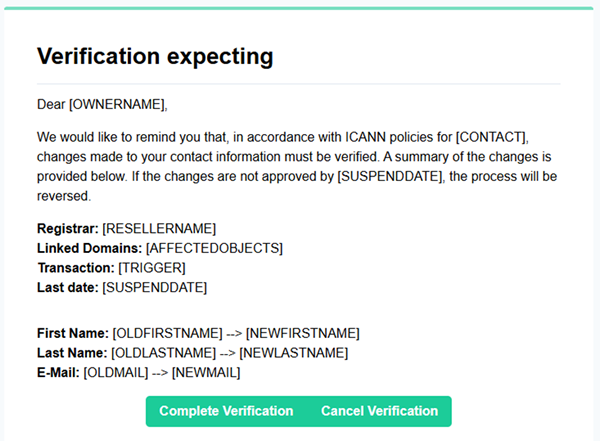
These emails are not WHOIS verification emails; they are part of the ownership change approval process.
The time granted for the parties to approve the Change of Registrant request:
If no approval is given within this period, the request is automatically cancelled.
The Change of Registrant process is different from WHOIS/RDDS email verification:
Once the Change of Registrant is successfully completed, a 60-day transfer lock is applied to the domain name in accordance with the ICANN Transfer Policy.
During this period, the domain name cannot be transferred to another registrar. Domain renewal, DNS management, and internal transfers are not affected.
If a Designated Agent is selected:
For questions about the Change of Registrant or Designated Agent processes, you may contact the Atak Domain Support Team (destek@atakdomain.com)