

From Local to Global: Leveraging New Domain Extensions to Expand Your Business
13.09.2024
SSL Certificate secures the communication between web pages and browsers, providing strong authentication.
Expired SSL certificates disrupt the secure connections of websites, display warning messages to users trying to access the site, and cause concern among visitors.
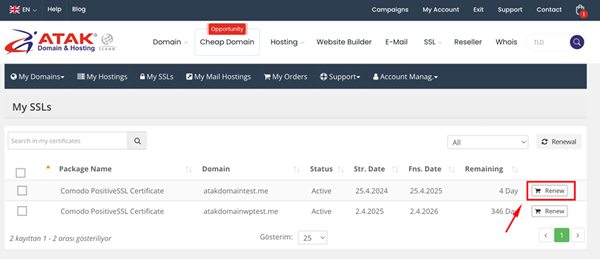
SSL certificates are sold as 1–2-year subscriptions; since March 15, 2026 a single certificate is valid for at most 200 days from its start date. The SSL certificate should be renewed by purchasing a new one before the expiration date.
In this article, we will explain step-by-step how to renew an SSL certificate.
To Renew Your SSL Certificate:
1- Log in to the Customer Control Panel:
Log in to the Atak Domain customer control panel.

2- Select Your SSL Account:
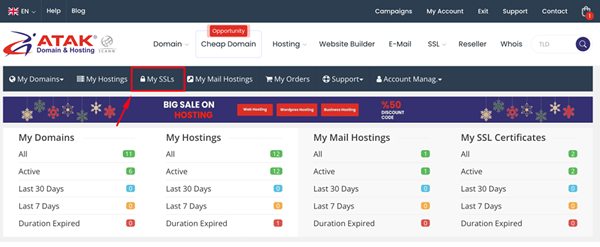
Click on the “My SSLs” button in the Atak Domain customer control panel.
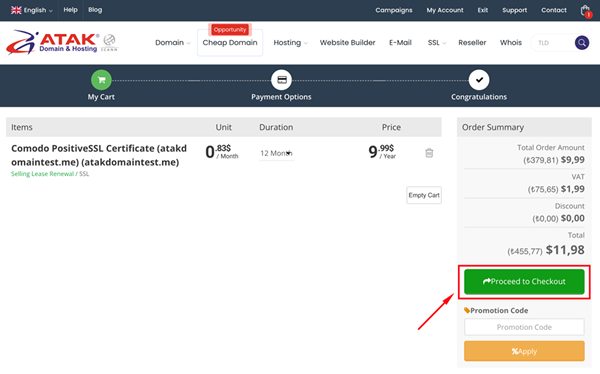
Congratulations!
You have successfully completed the certificate renewal process.
After your payment, our expert technical support team will provide you with free technical assistance for your SSL installation.