An SSL certificate type preferred by banks, large corporate websites and e-commerce platforms requiring high trust, undergoing comprehensive company verification by the certificate authority and providing the highest level of trust.
Dynamic Site Seal and the highest data security standard
Rigorous and detailed document verification process conducted by experts
Maximizes your online brand reputation on the internet
An SSL certificate type that secures both multiple primary domains and an unlimited number of subdomains tied to those domains with a single certificate, offering the most flexible and cost-effective solution for organizations with complex web infrastructure.
Add unlimited *.yourdomain.com subdomains
Easy SSL management from a single panel instead of dozens of separate certificates
A single, central installation even on complex server infrastructures
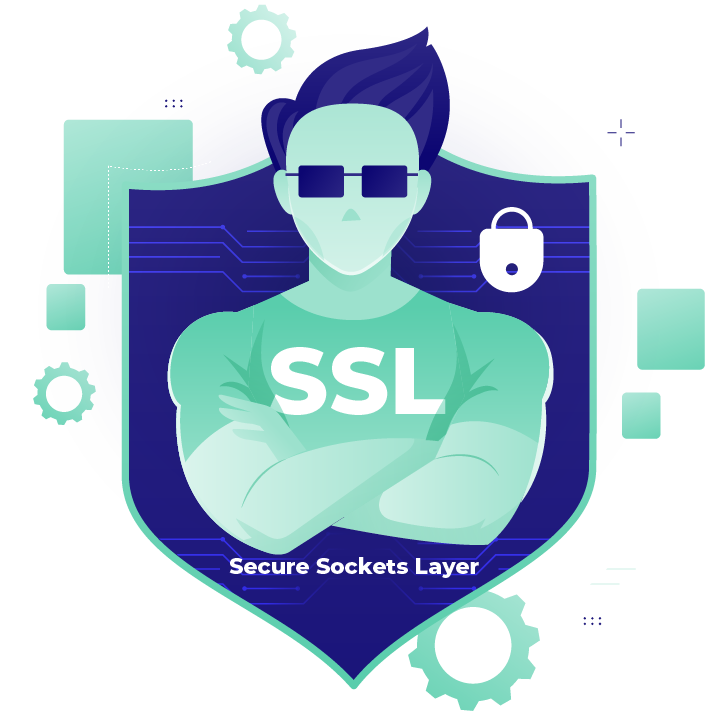
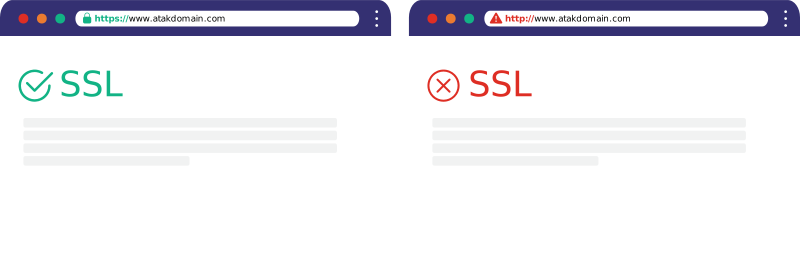
An SSL Certificate (Secure Sockets Layer) is a digital identity file that secures data communication between a website and its visitor through encryption. Its main purpose is to prevent sensitive data entered on websites — such as usernames, passwords and credit card details — from being read or stolen by third parties. You can tell that a website uses SSL by the https:// protocol or the Connection Secure label in your browser's address bar.
SSL certificates come in different types based on their validation levels. Domain Validation (DV) is the most basic security certificate and only verifies domain ownership; it is ideal for blog sites. Organization Validation (OV) confirms not only domain ownership but also the physical existence of the requesting organization, offering a higher level of trust. Extended Validation (EV) has the most comprehensive validation process and provides maximum trust by displaying the company name in the browser's address bar; it is usually preferred by banks and e-commerce sites.
With an SSL Certificate, protect user data at the highest level while raising your search engine rankings (SEO) by giving your site 'secure' status.
Protect User Data from Cyberattacks
Increase Site Traffic and Sales
Support SEO and Trust with HTTPS
Strengthen User Trust and Brand Credibility
Add Value to Your Brand with an SSL Certificate!
Websites without an active and correct SSL show a "cannot provide a secure connection" error in browsers like Google. Websites with an SSL Certificate rank higher in search engines.
How to Buy and Install an SSL Certificate
Do you want to buy an SSL Certificate to protect your website but don't know what to consider before purchasing one? By following the steps below, you can buy the most suitable SSL certificate for your website.
1
1. Choose the Right SSL Certificate Type
First, you should decide what type of certificate you need. If you have a personal blog or portfolio site, a DV (Domain Validation) certificate that only verifies your domain will be sufficient. If you want to display information about your company, you should choose OV (Organization Validation), and if you have a project requiring maximum trust such as a bank or an e-commerce site, you should prefer the EV (Extended Validation) certificate offering the most comprehensive validation.
2
2. Add the SSL Certificate to Your Cart
Click the "add to cart" button for the SSL security certificate (DV, OV) suitable for your website, enter the website address (domain) for which you want to purchase SSL, and proceed to the order payment step.
3
3. Verify Your Domain and Complete the Purchase
Complete the purchase by checking "your domain address" for the security certificate you added to your cart.
4
4. Install and Activate the SSL Certificate
SSL Certificate installations are done automatically. However, using the information sent to your email address, you can complete the installation of your security certificate with our "SSL Certificate Installation" content. For (EV-OV) security certificates, information about your business is required. You can submit this information through the "Support Panel".
Compare SSL Validation Levels
Not sure which SSL Certificate to get? Review the SSL certificate types to find the SSL that suits your website's needs!
It is the most basic and common type of SSL certificate. The Certificate Authority only verifies that the applicant controls the domain. This verification is usually done quickly via email or a DNS record.
Therefore, when thinking about which SSL certificate to get, if budget and speed are your priorities, this certificate is an ideal start for small blogs and personal websites.
Quick Setup
Advantages
Fast and easy installation, low cost. The installation is usually completed within 5-15 minutes.
Differences
It only verifies domain ownership and provides no information about company identity. The validation process is quite short.
Ideal Users
Personal blogs, portfolio sites, small web projects and early-stage projects.
In this certificate type, in addition to domain ownership, the corporate information of the applying company — such as its physical existence and legal records — is verified.
It is frequently preferred by SMEs and commercial websites looking for a more corporate answer to the question of which SSL certificate to get. It increases customer trust and strengthens the corporate image.
Corporate Option
Advantages
It offers a higher level of trust than DV certificates. Company information appears in the certificate details, which increases trust in the site.
Differences
The validation process can take a few days and requires more documents. It is slightly more expensive than DV.
Ideal Users
SMEs, commercial websites, businesses selling products and sites that value customer trust.
It is the certificate type that provides the highest level of security and trust. The Certificate Authority puts the company through a very strict and detailed validation process. During this process, the company's legal, physical and operational existence is rigorously examined.
It is the most suitable option for e-commerce sites, banks and large organizations handling sensitive user data. It is the most reliable and comprehensive type of SSL certificate.
Highest Trust
Advantages
It offers visitors the highest level of assurance. The richest company information is shown in the certificate details and the validation is very comprehensive.
Differences
It is the most expensive certificate type with the longest validation process. Once documents are complete, validation usually takes 1-5 business days.
Ideal Users
E-commerce sites, banks, financial institutions and large organizations handling sensitive data.
What Is ACME SSL?
ACME (Automated Certificate Management Environment) is a protocol that standardizes and automates the communication between your web servers and the organizations issuing SSL certificates (Certificate Authorities - CA). It was developed by Let's Encrypt, the world's largest free SSL provider, and has become an industry standard today.
ACME SSL vs. Traditional SSL
ACME SSL (Automated Management)
Featured
Certificate Creation
Creation is done automatically via a client and the process is completed in 5 minutes or less.
Installation
It can be installed automatically by the ACME client. By managing the process automatically, it eliminates manual work.
Renewal
Automatic renewal before expiry; the process is done automatically.
Scalability
Multiple domains or subdomains can be easily managed automatically.
Downtime Risk
Very low – certificate renewal is handled automatically.
Short-Lived Certificates
Since 90-day or 45-day certificates are renewed automatically, no issues occur.
Management Burden
Minimal – after a one-time configuration, almost no human intervention is needed.
Ideal For
DevOps teams, hosting companies, SaaS platforms and systems that want automation.
Traditional SSL (Manual Management)
Certificate Creation
CSR generation and the domain process must be followed manually.
Installation
It must be installed manually on each server. Manual filing and technical intervention are required.
Renewal
It is prone to human error before expiry. The renewal process is done manually.
Scalability
As the number of domains increases, the management burden grows linearly.
Downtime Risk
High – if renewal is not done before expiry, the site becomes inaccessible.
Short-Lived Certificates
Short-lived certificates require more manual maintenance.
Management Burden
High – tracking expiry, planning and technical intervention are required.
Ideal For
Small systems or businesses that do not want automation.
Web Servers That Support ACME
The ACME (Automated Certificate Management Environment) protocol can work seamlessly on almost all widely used web servers today. Many platforms support this system, primarily Apache, Nginx, LiteSpeed, Microsoft IIS, Caddy and Traefik. While some modern servers such as Caddy and Traefik have built-in (automatic) ACME support, on servers like Apache, Nginx or IIS you can usually perform this by installing a lightweight client software such as Certbot, acme.sh or win-acme.
SSL Certificate Providers
Secure your website's safety and brand reputation with globally recognized SSL certificate providers. By reviewing the certificates of leading brands that offer solutions for every budget and need below, you can easily make the right choice for your project.
SSL Certificate Brands
Explore SSL Certificate Brands
Choose a certificate from the world’s leading SSL brands to fit different budgets and needs.
How to Migrate an SSL Certificate to Another Server
When you point your domain's DNS records to Atak Domain servers and send us your existing certificate's Private Key (.key) and Certificate (.crt) files via a support request, you can easily benefit from our Free SSL Certificate Migration service.
Compare technical features to choose the SSL certificate that best suits your needs
Technical Features
Quick Setup (DV)
For Companies (OV)
Enterprise (EV)
Wildcard SSL
Number of Supported Domains
1Single Domain
1Single Domain
1Single Domain
Unlimited Subdomains
Encryption Strength
128 / 256-bit Industry Standard
128 / 256-bit Industry Standard
128 / 256-bit Industry Standard
128 / 256-bit Industry Standard
Algorithm (Hash)
SHA-256 Modern Security
SHA-256 Modern Security
SHA-256 Modern Security
SHA-256 Modern Security
CA Warranty
$10,000 – $500,000Low Level
$50,000 – $1,750,000Mid Level
$1,000,000 – $2,000,000Highest Level
VariableCovers Unlimited Subdomains
Fast Activation
5-15 Minutes
1-3 Business Days
1-5 Business Days
5-15 Minutes
Validation Level
Domain (DV)
Organization (OV)
Highest (EV)
DV / OV
Browser Trust Indicator
SSL Icon
SSL Icon
Corporate Identity
SSL Icon
Dynamic Site Seal
Varies by Type
Reissue
Free
Free
Free
Free
Mobile Browser Compatibility
99.9% Compatibility
99.9% Compatibility
99.9% Compatibility
99.9% Compatibility
Why Choose Atak Domain for Your SSL Certificate?
Fast Activation
Your certificate becomes active within minutes after purchase. No technical knowledge required.
Wide Range of SSL Certificates
A solution for every need with DV, OV, EV, Wildcard and Multi-Domain options.
Competitive Pricing
Top-level SSL security at the most competitive prices in the industry. Additional discounts on long-term plans.
Frequently Asked Questions About SSL Certificates
How Are SSL and HTTPS Related?
SSL (Secure Sockets Layer) is a global standard security technology that secures data communication between a website and its visitor through encryption. It makes your website address start with "https" instead of "http" and displays a padlock icon in the browser. This protects customer information, credit card numbers and other sensitive data.
What Does 128-bit SSL Mean?
128-bit SSL means that data communication between the website and the visitor is protected with a 128-bit encryption key. This encryption method prevents the transmitted information from being read by third parties, providing a basic level of secure data transfer and offering sufficient security for many standard websites.
What Does 256-bit SSL Mean?
256-bit SSL refers to data communication being protected with a 256-bit encryption key. It has a much stronger security level than 128-bit encryption and is especially preferred for e-commerce sites, payment systems and platforms processing sensitive user data.
How Do You Install an SSL Certificate on a Website?
To add an SSL certificate, you first purchase an SSL certificate and install it on the domain via the hosting panel or server. After the installation is complete, the website is configured to run over the HTTPS protocol instead of HTTP, and with the necessary redirects all site traffic is served over a secure connection.
How Much Does an SSL Certificate Cost?
SSL certificate prices vary depending on the certificate type, the brand provider and the validation level. While simple domain-validated (DV) SSL certificates usually start from a few hundred liras per year, organization-validated (OV) and extended-validation (EV) SSL certificates may be offered in higher price ranges.
What Is SSL Certificate Migration?
SSL certificate migration is the process of transferring an existing SSL certificate to another hosting account or server. As long as the same domain continues to be used, the certificate can be reissued and installed on the new server, and thanks to this process it can continue to be used on a different infrastructure before it expires.
What Is the Difference Between DV, OV, EV and Wildcard SSL?
SSL certificates are divided into different types according to their validation level and purpose of use. The most common SSL types are domain-validated (DV) SSL, organization-validated (OV) SSL and extended-validation (EV) SSL certificates. There are also special certificate types used to protect multiple domains or subdomains, such as wildcard SSL, multi-domain SSL and SAN SSL.
What Happens If a Website Does Not Have an SSL Certificate?
If your website does not have an SSL certificate, a prominent "Not Secure" warning appears in the URL bar of your visitors' browsers, and since all data flow between the server and the user is transmitted unencrypted as plain text, sensitive information such as passwords, credit card details or personal data can easily be intercepted, read and stolen by cyber attackers.
Is an SSL Certificate Required for GDPR Compliance?
Yes, an SSL certificate is absolutely necessary in today's web world; because it both increases brand trust in your site by ensuring user security, forms the basis for compliance with legal data protection standards such as KVKK/GDPR, and directly affects your site's visibility since search engines like Google use a secure HTTPS connection as a search engine optimization (SEO) ranking criterion.
How Do You Fix Common SSL Certificate Errors?
To fix an SSL error you encounter on your website, you should first check whether the certificate has expired; if you are getting a mixed content error, you should use redirect plugins or database queries to update the links starting with HTTP (images, CSS or JS files) in your site's source code to HTTPS; and finally you should make sure that your server's date/time settings are correct and that the CA root certificates were fully installed during the SSL setup.
What Does an Invalid SSL Certificate Mean?
An invalid SSL certificate means that the security certificate presented by the visited website is not considered trustworthy by the web browser for various reasons; this is usually caused by the certificate's expiry date having passed, the certificate being created by an untrusted source (for example, self-signed), the domain in the address bar not matching the domain registered to the certificate, or the intermediate validation files in the certificate chain being incompletely installed on the server.
What Should You Consider When Choosing an SSL Certificate?
Choosing the right SSL certificate depends on your website's needs and budget. If asked "what is an SSL certificate?", it can be said that there are different SSL certificate types: Domain Validation (DV), Organization Validation (OV) and Extended Validation (EV).
The Domain SSL certificate (DV) is the simplest type. It only verifies domain ownership and is ideal for personal blogs. OV certificates additionally check company data and are suitable for SMEs and smaller e-commerce sites. EV certificates offer the highest security by displaying the company name in the browser's address bar. This is the best choice for banks and large e-commerce platforms, where you should buy such a high-quality SSL certificate.
How Do You Check Whether an SSL Certificate Is Valid?
Checking a website's SSL Certificate is quite simple. When you visit the website you want to check (https://site-address*com) in your browser's address bar and do not encounter any warning such as "This Site Cannot Provide a Secure Connection", you can tell that the website has an SSL Certificate.
To externally find out what type of SSL Security Certificate a site uses, you can visit our "SSL Check" page, or after visiting the site address you want to check, click the "view site information" button in the top-left corner. After clicking the "connection is secure" section in the panel that opens, click the "certificate is valid" section to access a lot of information such as the SSL type and brand the site uses.
What Happens If There Is No SSL Certificate?
When a website does not have an SSL certificate, users trying to visit the site are met with a "This site is not secure" warning from their browsers. This warning directly and negatively affects visitors' trust in the site and can cause most users to leave it.
Moreover, search engines like Google consider web security an important ranking criterion. Sites without an SSL certificate are seen as disadvantaged in terms of both user experience and security, and this can lead to reduced visibility in search results. As a result, a website that does not use an SSL certificate may experience serious losses in terms of user trust, data security and SEO performance. In today's digital standards, an SSL certificate is not just a security measure for websites but also a fundamental requirement to stay competitive.
What Is the Difference Between 128-bit and 256-bit SSL?
In SSL certificates, the "bit" value is used to express the length of the encryption key and thus the security level. The basic difference is how strong the encryption is. 256-bit SSL has far more key combinations than 128-bit SSL. This makes cracking data encrypted with 256-bit astronomically harder. Today, 256-bit encryption has become the industry standard for sites requiring high security, such as banking and e-commerce.
Why Do You Need a Certificate?
Select your purpose of use so we can find the SSL that best suits your needs.