What Should You Consider When Choosing an SSL Certificate?
Choosing the right SSL certificate depends on your website's needs and budget. If asked "what is an SSL certificate?", it can be said that there are different SSL certificate types: Domain Validation (DV), Organization Validation (OV) and Extended Validation (EV).
The Domain SSL certificate (DV) is the simplest type. It only verifies domain ownership and is ideal for personal blogs. OV certificates additionally check company data and are suitable for SMEs and smaller e-commerce sites. EV certificates offer the highest security by displaying the company name in the browser's address bar. This is the best choice for banks and large e-commerce platforms, where you should buy such a high-quality SSL certificate.
How Do You Check Whether an SSL Certificate Is Valid?
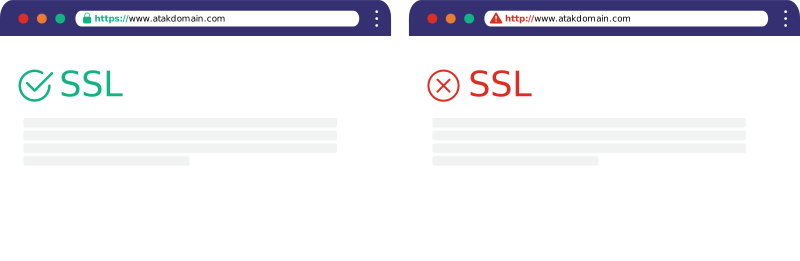
Checking a website's SSL Certificate is quite simple. When you visit the website you want to check (https://site-address*com) in your browser's address bar and do not encounter any warning such as "This Site Cannot Provide a Secure Connection", you can tell that the website has an SSL Certificate.
To externally find out what type of SSL Security Certificate a site uses, you can visit our "SSL Check" page, or after visiting the site address you want to check, click the "view site information" button in the top-left corner. After clicking the "connection is secure" section in the panel that opens, click the "certificate is valid" section to access a lot of information such as the SSL type and brand the site uses.
What Happens If There Is No SSL Certificate?
When a website does not have an SSL certificate, users trying to visit the site are met with a "This site is not secure" warning from their browsers. This warning directly and negatively affects visitors' trust in the site and can cause most users to leave it.
Moreover, search engines like Google consider web security an important ranking criterion. Sites without an SSL certificate are seen as disadvantaged in terms of both user experience and security, and this can lead to reduced visibility in search results. As a result, a website that does not use an SSL certificate may experience serious losses in terms of user trust, data security and SEO performance. In today's digital standards, an SSL certificate is not just a security measure for websites but also a fundamental requirement to stay competitive.
What Is the Difference Between 128-bit and 256-bit SSL?
In SSL certificates, the "bit" value is used to express the length of the encryption key and thus the security level. The basic difference is how strong the encryption is. 256-bit SSL has far more key combinations than 128-bit SSL. This makes cracking data encrypted with 256-bit astronomically harder. Today, 256-bit encryption has become the industry standard for sites requiring high security, such as banking and e-commerce.