

What Is Reseller Hosting?How to Start Selling Web Hosting
14.08.2026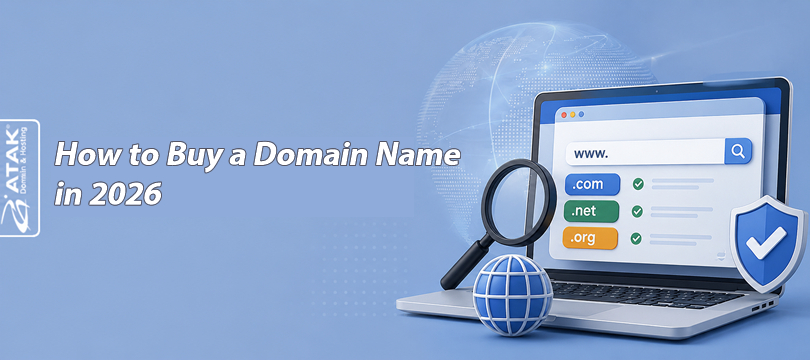
In short: buying a domain name means paying a registrar to register a contractual right to use that name for a set, renewable term — usually one to ten years. Pick a name, choose an extension, check availability, compare the registration price against the renewal price, complete registrant verification, pay, then point the domain at a website or mailbox. The name itself is rarely the hard part — the fine print around pricing and renewal is.

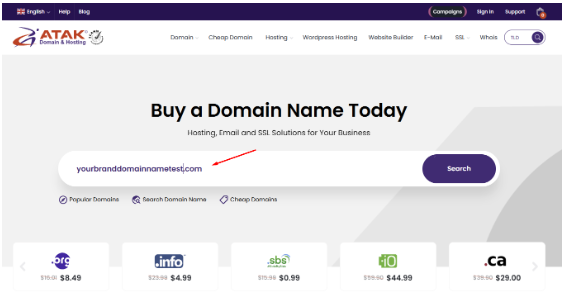
Atak Domain's search bar — the starting point for almost every domain purchase.
A domain name isn't property in the way a house or a car is. When you "buy" one, you're registering a contractual right to use and manage a unique address inside a shared, publicly coordinated system — the Domain Name System, or DNS — for as long as you keep paying to renew it.
These three words get used loosely, but they describe three different roles.
.com and .net. Individuals don't buy directly from a registry; they go through an accredited registrar.A simple way to picture it: the registry is the wholesale record-keeper, and the registrar is the retail shopfront you actually deal with.
No — not in the way you own physical property. Registering a domain gives you a contractual right to use and manage that name for a renewable term, typically one to ten years, through your registrar. Keep paying to renew and the right continues; let it lapse, and the name eventually returns to the public pool for anyone to register.

Every registrar frames the process a little differently, but the underlying sequence is the same. Here's the short version — each step that needs more detail links to a fuller section below.
Decide whether this is a permanent brand asset or something for a short-term campaign, whether it needs to match an existing trademark exactly, and whether people will mostly type the address or arrive through a link. That decision shapes how much time is worth spending on the name itself.
Generate more candidates than you think you'll need — five to fifteen is realistic — and test each one for spoken clarity, spelling ambiguity, and length. A regional bakery choosing between "flourandsalt" and "flour-and-salt," for example, should skip the hyphen: it's easy to mishear and mistype.
Search the name against your country's trademark database and the open web before registering it. This isn't legal advice — for anything representing a real business, a formal trademark search or a qualified attorney is worth the cost, since registering a domain doesn't grant trademark rights, and holding a trademark elsewhere doesn't guarantee you the matching domain either.
.com remains the most broadly recognized option, but ccTLDs and newer extensions like .shop or .io are often reasonable alternatives, each with its own rules. See How to Choose the Right Domain Extension below for the full comparison and a table of what to check before registering.
Type the name into a registrar's search tool to see whether it's already registered — Atak Domain's domain name search checks .com, ccTLDs like .com.tr, and a wide range of newer extensions in one pass. Results can shift between searches, and a "premium" label just means the registry or a private seller has priced the name above standard rates — not that anything is wrong with the listing.
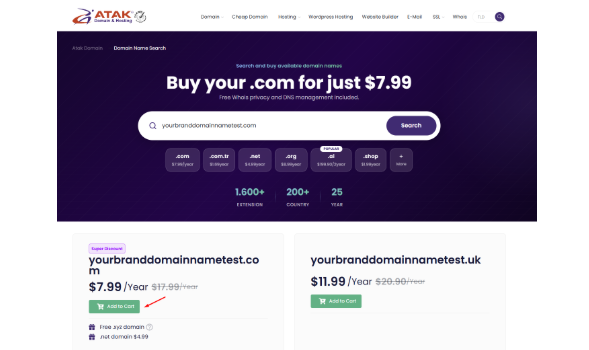
A live domain search on Atak Domain, showing registration prices across .com, .com.tr, .net, .org, .ai, and .shop side by side.
START HERE
You've got a shortlist — now see what's actually available. Check the name across .com, .net, .org, .com.tr, and other extensions, and see the current registration price for each before you decide anything else.
No account is required just to search.
Not every registrar is interchangeable. Compare the renewal price, not just the first-year discount, along with what's bundled in, transfer policy, support quality, and accreditation for the specific extension you want.
.com well doesn't automatically have the same experience with a restricted ccTLD.Domain pricing has more parts than a single sticker price: registration, renewal, transfer, redemption, and optional add-ons can all differ. See How Much Does a Domain Name Cost? below for a full breakdown and a real pricing snapshot.
Most registries require accurate registrant details — name, address, email, and phone number. Extensions governed by ICANN gTLD policy also require email verification, which can suspend the domain if it's skipped, so use an address you'll still be checking months from now.
Select a term, confirm registrant details, choose any add-ons, accept the registration agreement, and pay. Paying doesn't always finish every requirement instantly — some extensions add verification or registry approval afterward, particularly restricted ccTLDs.
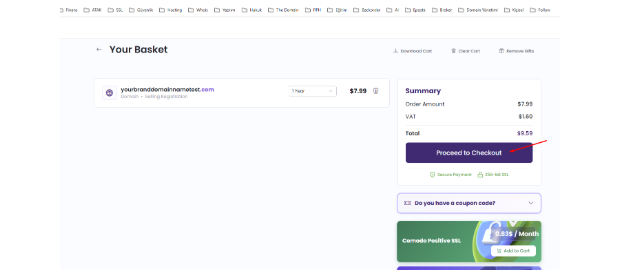
A domain in the cart, with the order total shown before checkout — including VAT.
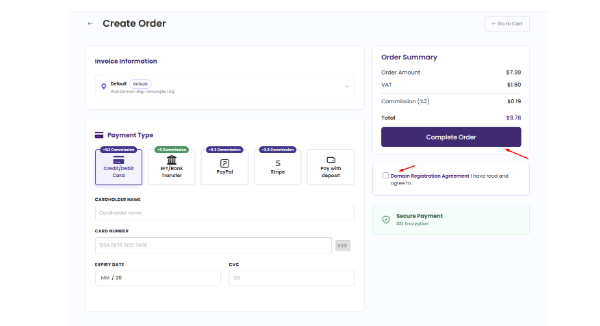
The final payment step: invoice details, payment method, and the registration agreement checkbox.
COMPARE BEFORE YOU COMMIT
Search your shortlisted names, compare .com against a relevant ccTLD or new gTLD, and check the current registration price for each — then review the matching renewal price on the pricing page before adding anything to your cart.
Prices are shown before checkout, with no obligation to buy.
Turn on two-factor authentication, confirm the domain lock status, and keep contact and payment details current. Auto-renewal helps, but it's a safety net, not a guarantee — see What to Do After Buying a Domain below for the full checklist.
The extension — also called a TLD, or top-level domain — is the part after the dot. .com remains the most broadly recognized option worldwide, but it isn't the only reasonable choice, and it isn't always available for the name you want.
Generic TLDs (gTLDs) like .com, .net, .org, .shop, and .store are open for registration by almost anyone, anywhere, subject to the registry's own rules.
Country-code TLDs (ccTLDs) like .uk, .fr, .ca, or .com.tr are tied to a specific country or territory. Some are open to global registrants with no local ties required; others require a local contact, presence, or supporting documentation. This varies by registry and can change, so check the specific requirements for the extension you want rather than assuming they all work the same way.
A technical note worth knowing: .io and .ai are marketed and used as generic tech and AI extensions, but both are, administratively, ccTLDs — .io is assigned to the British Indian Ocean Territory and .ai to Anguilla. In practice they register like open gTLDs, with no local-presence requirement, but they remain ccTLDs on paper, which matters if either registry ever changes its registration policy.
| Extension type | Typical use | Main advantage | Possible limitation | Check before registering |
|---|---|---|---|---|
.com (gTLD) |
General business, brands, global audiences | Broad recognition and trust | Popular short names are often taken | Whether the exact name and close variants are still available |
.net / .org (gTLD) |
Tech, nonprofit, fallback when .com is taken |
Widely accepted as an alternative | Slightly less trust signal for commercial brands | Whether your audience expects .org to signal nonprofit status |
New gTLDs (.shop, .store, .xyz) |
Niche branding, startups, e-commerce | Descriptive, often shorter, more availability | Less universal recognition; some carry premium pricing | Renewal price — first-year discounts are common |
ccTLD, open registration (.io, .ai, .co) |
Global tech brands wanting a distinctive look | Short, brandable, marketed globally | Technically a ccTLD whose registry could change policy | Whether the managing registry has announced any policy changes |
ccTLD, restricted (.fr, some .tr / .com.tr categories) |
Businesses targeting that specific country | Signals strong local relevance | May require local presence, ID, or a trustee/proxy service | Local-presence rules, required documents, processing time |
Don't assume every ccTLD follows the same rules. Some, like .de, are open to registrants worldwide with no local-presence requirement, though the registry may still ask for an administrative contact for service of process in certain situations. Others — including some .tr and .com.tr registration categories — can require supporting documents such as a trade registry record or tax number, and the rules are set by Turkey's TRABİS registry system, not by any individual registrar. If you're targeting a specific national market, confirm the current, extension-specific requirements directly with Atak Domain's country-code domain guide before you commit.

Domain pricing has more moving parts than a single sticker price suggests. Here's what typically shows up across the industry:
| Cost type | When it applies | What the buyer should verify |
|---|---|---|
| Initial registration | At the moment of purchase | The exact price for the selected term length, not just a per-year headline figure |
| Renewal | Every cycle after the first term | Whether the renewal price is published upfront or only shown at renewal time |
See Atak Domain's domain transfer page for the current transfer process and eligibility rules before moving a domain in or out, and its guide to domain name expirations for how grace and redemption periods actually work.
| Cost type | When it applies | What the buyer should verify |
|---|---|---|
| Transfer | When moving to a different registrar | Whether the gaining registrar's transfer fee includes a year of renewal |
| Redemption / restoration | If the domain lapses into a recovery period | The restoration price and grace-period length, typically higher than a standard renewal |
| Optional services | Domain privacy, extra DNS records, expedited support | Whether these are included by default or billed as add-ons |
| Taxes / currency conversion | Depends on billing country and payment currency | Whether the checkout price is tax-inclusive |
Prices verified on Atak Domain on [VERIFICATION DATE]: .com registers from $7.99 in year one, with a $17.99 standard renewal and a $10.99 transfer fee; .org from $8.99 registration with a $16.01 renewal; and .com.tr from $1.47 in year one. .net illustrates why the checkout screen matters more than the homepage banner: the domain-search widget shows a $4.99 bundle price when .net is added alongside a .com purchase, while the standalone .net registration on the general pricing table runs $14.99 with a $16.99 renewal.
Always confirm which number applies to your actual cart, not just the one on the search results page. Listed prices exclude VAT. Expiration and recovery rules also vary by extension: Atak Domain, like most registrars, offers an auto-renew grace period followed by a separate, higher-cost redemption period if a domain lapses — check the exact timeline and restoration price for your specific extension rather than relying on a single general figure.
Editorial note, remove before publishing: re-pull every figure above from Atak Domain's live pricing page or pricing API immediately before publish, replace [VERIFICATION DATE], and keep this paragraph current on every substantive revision — domain pricing changes without notice.
Most domains you'll find in a search are "standard" — priced according to the registry's normal fee schedule. A smaller subset are flagged "premium" by the registry itself: short, dictionary-word, or otherwise high-demand names priced individually, sometimes with a premium renewal price too. There's no universal rule for what makes a name premium — it's set by the registry's algorithm, not an objective standard. See Atak Domain's guide to what is a premium domain for worked examples.
Registry premium domains carry price risk but not ownership risk. Aftermarket and brokered domains carry both — see the risks section below before pursuing either.
Five things are worth doing right away, before the deeper setup below: complete any required email verification, turn on two-factor authentication, confirm the domain lock status, save the registrant login somewhere secure, and set nameservers or DNS records if a website or mailbox is ready to go live. If nothing is ready yet, that's fine — a registered domain can sit inactive without penalty as long as it stays renewed. Here's the detail behind each part of that list.
Registering a domain means supplying registrant information: name, organization if applicable, address, email, and phone number — standard across the industry and required by most registries.
For domain names governed by applicable ICANN gTLD requirements, registrars must validate and verify specified registration data, typically by sending a verification email to the registrant address, and the domain can be suspended if that verification isn't completed within a set window. Requirements can differ for ccTLDs, so check the specific registry's policy for the extension you're registering.
Domain privacy — sometimes marketed as WHOIS privacy — can mask some registrant details from public WHOIS lookups by substituting the registrar's contact information for yours. Availability depends on the extension and the registrar; some ccTLDs restrict or prohibit privacy services outright, and it isn't universally free even where it's offered.
Enable two-factor authentication on your registrar account, not just a strong password — it's the single highest-value security step available once the domain is registered.
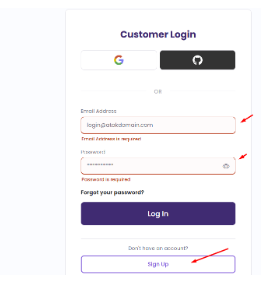
Signing in to a registrar account — the starting point for enabling two-factor authentication and checking the domain lock status.
These settings live in Atak Domain's domain management panel, alongside DNS and nameserver controls.
A registered domain doesn't automatically point anywhere. Connecting it to a live website is a separate step, and it depends on where the website is hosted.
Using a hosting provider's nameservers is the most common approach: you update the domain's nameserver records at the registrar to point to the hosting company's nameservers, and the host manages the rest of the DNS from there.
Using individual DNS records keeps DNS management at the registrar level instead: you'd typically add an A record pointing to your server's IPv4 address, and an AAAA record if the server supports IPv6.
A domain purchase by itself does not include hosting, a website builder, or a mailbox — those are separate products, even when a registrar bundles a promotional offer around them.
Email uses a different DNS record than a website does. An MX record tells other mail servers where to deliver messages sent to your domain — for example, you@yourdomain.com. Setting up a domain doesn't automatically create a mailbox; you need an email hosting service and then point the domain's MX records at that provider.
A short example: a consultant who buys "janedoeconsulting.com" and wants a professional inbox needs two separate things — the domain itself, and a business email plan pointed at that domain through MX records. Buying the domain alone gets neither a website nor a working inbox on its own.
For a deeper walkthrough with screenshots of the control panel itself, see Atak Domain's guide to what is DNS and how to update DNS information.
These two approaches to pointing a domain are often confused with each other.
In practice: either you hand off the whole zone by changing nameservers, or you keep the zone where it is and edit individual records inside it. Most setups use one approach or the other, not both at once.
| Record | Main purpose | Common example or use | Important caution |
|---|---|---|---|
| Nameservers | Authoritative DNS service for the domain | Pointing a domain to a hosting provider's DNS | Changes can take time and affect every record in the old zone |
| A | Maps a domain to an IPv4 address | yourdomain.com → 192.0.2.10 | Must be updated if the server's IP address changes |
| AAAA | Maps a domain to an IPv6 address | Used alongside an A record for IPv6-capable servers | Not every host supports IPv6 — check first |
| CNAME | Points one hostname to another hostname | www.yourdomain.com → yourdomain.com | Cannot be combined with other record types on the root domain in most setups |
| MX | Directs email for the domain to a mail server | Routing you@yourdomain.com to an email provider | Priority values matter — lower numbers are tried first |
| TXT | Stores text for verification and policy purposes | Ownership verification, SPF records for email | Conflicting SPF entries across multiple TXT records can break email delivery |
People often describe DNS changes as "propagating" across the internet, as though the update travels somewhere. What's actually happening is caching. DNS resolvers around the world store a copy of your records for a set period called the TTL (time to live).
Until that cached copy expires, different visitors — even the same visitor on different networks — can see the old and new values at the same time. That's why a DNS change can look instant to you and take hours to show up for someone else: you're not watching the same cache. Lowering the TTL before a planned change can shorten this window, but it doesn't eliminate it.
A WHOIS or RDAP lookup shows registration and contact information where it isn't redacted; check the domain's live website and DNS records separately to see whether it's actually in use, since WHOIS alone doesn't show that. Atak Domain's WHOIS search is a straightforward way to check this.
A backorder or broker service is worth considering if the name is genuinely important and might become available later, or might be negotiable with the current holder.
Buying a domain from a current owner — rather than registering a fresh name — carries risks a first-time registration doesn't.
If a secondhand domain matters enough to consider, verify current WHOIS/RDAP data, request proof of control from the seller, and treat the transfer as a distinct step from the negotiation itself.
Search for the name through a registrar, confirm it's available, compare the registration and renewal price, complete registrant information, then pay and accept the registration agreement. The whole process typically takes a few minutes once you know what name and extension you want.
No. A domain is registered for a renewable term, commonly one to ten years, not purchased outright. It has to be renewed to stay active, and it returns to the public pool if renewal lapses long enough.
It depends on the extension, whether the name is standard or premium, and whether you're looking at the first-year price or the ongoing renewal price. Common extensions like .com, .net, and .org typically run from a few dollars to a few tens of dollars per year at renewal; premium or restricted names can cost significantly more.
No. Many people register a domain first and build the website afterward, or register a name simply to reserve it before they're ready to launch anything.
The registration transaction itself typically completes in minutes. Some extensions add verification or eligibility checks that can extend activation by hours or days.
In most cases, yes, though transfer eligibility and fees vary by extension and by how recently the domain was registered or last transferred. The gaining registrar typically charges the transfer fee. Check the specific rules for your extension before assuming an immediate transfer is possible.
No, not by default. Domain registration and website hosting are separate products, even when a registrar bundles a promotion. A live website needs both a domain and a hosting plan or website builder.
Not an immediate loss, but the exact timeline depends on the extension. Most registrars offer an auto-renew grace period, often followed by a separate redemption period with a higher restoration fee, before the domain is finally released. Check the specific grace-period length and restoration cost for your extension rather than assuming a single deadline applies everywhere — if none of those windows are used, the domain eventually becomes available for anyone to register.
No. Availability depends on the extension and the registrar; some ccTLDs restrict or prohibit privacy services, and it isn't automatically free even where it's offered. Confirm privacy availability for your specific extension before assuming it applies.
Complete any required email verification, enable two-factor authentication on the registrar account, confirm the domain's lock status, and set up nameservers or DNS records if you're ready to connect it to a website or mailbox.
NEXT STEP
Search your preferred name, compare the available extensions, and review the current registration price. Before completing the order, check the applicable renewal terms for the option you choose.
Searching costs nothing and doesn't commit you to a purchase.