What Should I Do for a Domain Suspended Due to WHOIS Verification?
1) What is RDDS/WHOIS?
RDDS (Registration Data Directory Services) is a system that allows access to registration data (such as Registrant, Admin, Tech, Billing information) for domain names. Keeping WHOIS/RDDS data accurate and up-to-date is a core requirement under ICANN contracts.
2) Legal Basis and Dates
- ICANN Whois Data Accuracy Specification requires that the registrant’s email address must be verified within 15 days.
- Effective Dates: January 1, 2014 (for new TLDs), September 2014 (for existing gTLDs).
- Scope: gTLD/nTLDs (ICANN-managed). ccTLDs (e.g., .IN, .CO.IN) generally do not fall under this, but some ccTLDs apply the same verification process based on their current agreements.
3) Why Was My Domain Suspended?
ICANN requires domain owners (registrants) to verify their information (including name, surname, email address) within 15 days of:
- New domain registration if the registrant’s email address is not verified.
- Domain transfer from another registrar.
- Registrant change if the new registrant's email is not verified.
- Email update if the registrant’s email address is updated without verification.
Failure to verify the email address within this period results in the domain being suspended.
4) What Events Trigger the Verification Process?
Any of the following changes will initiate the 15-day verification process:
- New domain registration, if the registrant email is not verified,
- Domain transfer from another registrar,
- Registrant change, if the new registrant's email is not verified,
- Email address update, if the new email address is not verified.
5) Steps to Lift the Suspension
A) If the Registrant Email is Correct:
- Check for the Verification Email: Look for the email with the subject "Domain Verification Reminder." Click the "Complete Verification" button to verify your contact details.
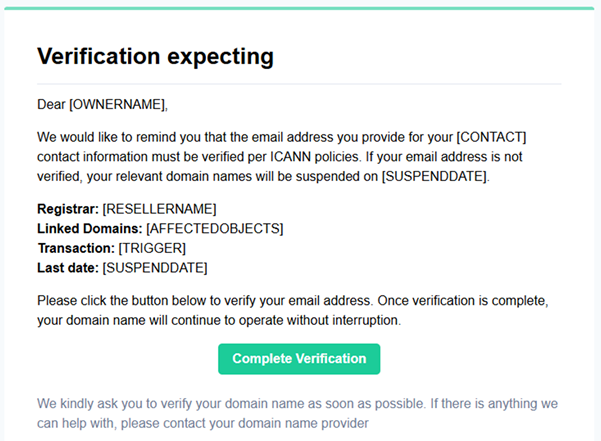
- Wait for the Domain to Be Reactivated: After verification, the suspension is usually lifted within a few minutes. Once DNS propagation is complete, your website and email services will be accessible again.
B) If the Registrant Email is Incorrect or Invalid:
In this case, Atak Domain needs to initiate the email change on your behalf.
- Complete and sign the Authorized Representative form. - Download
- Submit an ID document (for individual accounts) or a company document (for corporate accounts) that matches the authorized representative's name.
- Indicate the domain and contact information you are requesting to change.
The Authorized Representative can only be used when the user cannot make changes or access the old email address due to specific circumstances.
C) If the Verification Link Is Not Working:
- Search the Domain in your browser.
- Click the “Resend Verification” button on the page that appears.
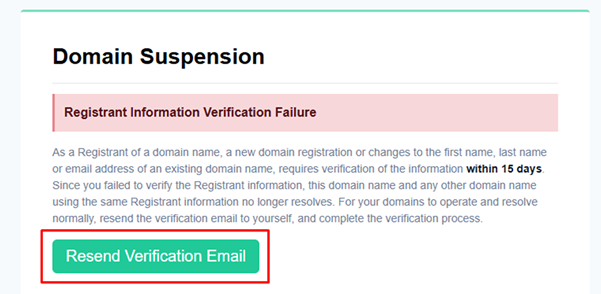
- Enter the email address listed in the domain’s contact information.
- Open the verification email and click the "Complete Verification" button.
- Your domain will then be reactivated.
6) Preventing Future Suspensions:
- Keep your contact information up to date.
- Ensure emails from Atak Domain are not marked as spam.
- Verify email requests promptly when you receive them.
7) Frequently Asked Questions (FAQ)
- • Is verification mandatory for ccTLDs?:
- No, ccTLDs are generally not required to follow the same verification process, but some ccTLDs (e.g., .IN) may apply similar rules.
- • Do I need to verify each domain separately if I use the same email address?:
- No, once an email address is verified, all domains using the same registrant email will be considered verified.
- • What if I don’t receive the verification email?:
- Check your spam/junk folder, use the "Resend Verification" button on the domain's suspension page, and update the registrant email if needed.
- • How long does it take for my domain to become active again after verification?:
- Usually within minutes. Full access may take a few minutes due to DNS propagation.
By following these steps, you can prevent domain suspensions and ensure continuous service. If you experience any issues or your domain doesn’t reactivate, please contact the Atak Domain support team through the ticket system.