10 company types who should be using the .ONLINE domain. Are you one of them?
03.03.2021
Wondering how to protect your WordPress site from cyber threats? In this guide, we cover the best WordPress security plugins available and walk through how to implement effective security optimization for your site.

Securing your WordPress site — protecting it from data breaches, malware infections, and brute force attacks — is one of the most important things you can do as a site owner. Using a dedicated WordPress security plugin is one of the most practical steps you can take. Here are the best and most widely used options, organized by technical level and use case:
All In One WP Security & Firewall is a free, comprehensive security plugin for WordPress that covers a wide range of vulnerabilities without requiring any technical expertise. Its main features:
Brute Force Protection: Limits login attempts and enforces CAPTCHA verification on the login page, making automated credential-stuffing attacks far less effective.
Weak Password Detection: Identifies default admin usernames and weak passwords before attackers do.
Firewall Protection: Uses a basic WAF to block suspicious requests including bot traffic and DDoS patterns.
Database Security: Offers database prefix changes and backup tools that harden the database against SQL Injection attempts.
Security Score: Gives your site a live security score based on your current settings, so you can see exactly what needs attention.
Beginner-Friendly Interface: Designed for users without technical backgrounds, with a clear and intuitive dashboard.
Step 1: Go to your WordPress Admin Panel > Plugins > Add New, then search for "All In One."
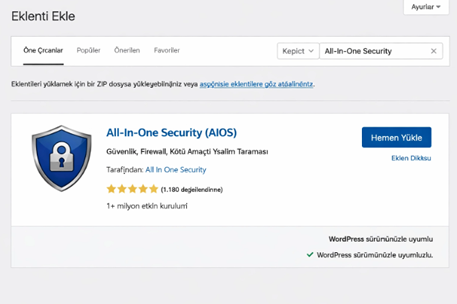
Step 2: Click Install Now.
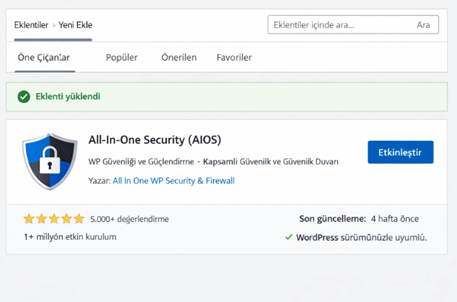
Step 3: Go to Plugins and activate the All-In-One Security plugin.
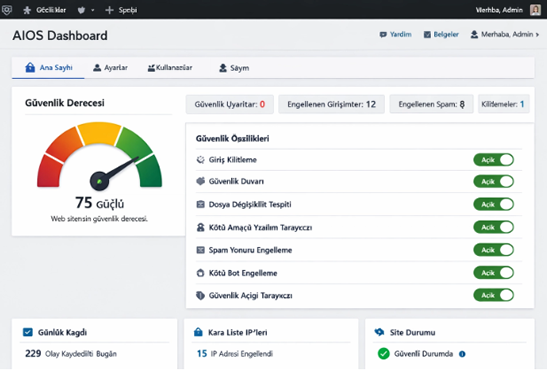
Step 4: Enable the plugin settings to complete your WordPress security setup.
Sucuri Security is a cloud-based WordPress security plugin built around one core principle: protecting the integrity of your site's files. It is a professional-grade tool for both preventing attacks and recovering from them quickly.
File Integrity Monitoring: Detects the smallest unauthorized change to your WordPress files in real time. If someone uploads a suspicious file or modifies an existing one, Sucuri alerts you immediately — preventing malware from hiding quietly inside your installation.
Malware Scanning: Uses Sucuri's widely-trusted SiteCheck scanner to regularly check your site for malicious code, suspicious redirects, and iframe injection attacks.
Blacklist Monitoring: Tracks whether your site has been flagged by Google, Norton, AVG, or other security authorities. If your domain gets blacklisted, you will know before it affects your search engine visibility.
Security Auditing and Event Logging: Logs every activity on your site — login attempts, file changes, plugin updates, and more. When a breach occurs, you get detailed reports answering: who did what, and when.
Security Hardening: Strengthens WordPress's known weak points with a single click. This includes hiding version information, blocking PHP execution in the uploads folder, and adding extra protection layers to the admin panel.
Solid Security (formerly iThemes Security) is a comprehensive WordPress security solution that focuses on two strategies: lockdown and hardening. It closes the invisible gaps in your site and helps you minimize the damage caused by human error.
Two-Factor Authentication (2FA): Requires users to verify their identity with both a password and a code sent via mobile app or email. Even if a password is stolen, an attacker cannot access the account without that second factor.
Away Mode: Completely locks down the WordPress admin panel during specified hours — for example, overnight when you are not using it. This eliminates the attack surface during periods of inactivity.
Database and Server Hardening: Hides WordPress version information, disables directory browsing, and restricts write access to critical files like wp-config.php and .htaccess — all in a single click.
User Activity Monitoring: Tracks user behavior and automatically logs out sessions that have been idle for a set period. It also enforces strong passwords across all user roles, reducing the risk of insider-level vulnerabilities.
Wordfence Security is the most widely installed WordPress security plugin in the world, and arguably the most powerful. It functions like a digital fortress — stopping attacks before they ever reach your site.
Endpoint Firewall (WAF): Unlike cloud-based solutions, Wordfence analyzes all incoming traffic directly at the server level. It identifies and blocks malicious traffic, harmful bots, and known attack patterns before they load on your site.
Comprehensive Malware Scanning: Scans WordPress core files, themes, and plugins for security vulnerabilities on a regular basis. It compares your files against original versions and surfaces any hidden injected code.
Real-Time Threat Intelligence: Continuously updates its threat database with the latest known attack signatures. When a new attack type is discovered anywhere on the web, your site can be protected within minutes.
Live Traffic Monitoring: Shows you real-time visitor data and hack attempts. You can see exactly who is visiting, which pages are being targeted, and which IP addresses have been blocked for attack behavior.
Login Security and 2FA: Protects the login panel at the highest level against brute force attacks. Two-factor authentication adds a second verification layer so that even a stolen password is not enough to gain access.
Access Control and Security Hardening: Advanced restriction tools let you block traffic from specific countries, permanently ban suspicious IP addresses, and set strict limits on login attempts — giving you full control over who can interact with your site.
WordPress powers a significant share of the web, which makes it a priority target for attackers. Outdated software, weak passwords, misconfigured settings, and untrusted plugins all create real exposure. Knowing what you are up against — and applying the right WordPress security measures — is essential. Consistent security optimization makes your site progressively more resilient over time.
Brute force attacks involve automated scripts that systematically try thousands of username and password combinations against your WordPress login page. Common usernames like "admin" combined with weak passwords dramatically increase the success rate of these attacks.
The impact goes beyond account compromise. Sustained brute force traffic can exhaust server resources and slow your site significantly. Strong passwords, login attempt limits, and two-factor authentication are the baseline defenses. Hardening your login configuration is one of the most effective early WordPress security steps you can take.
In an SQL Injection attack, an attacker sends malicious database queries through unsecured input fields — contact forms, search boxes, comment sections. The goal is to extract sensitive data: user credentials, order records, or administrator access.
XSS (Cross-Site Scripting) attacks inject malicious code into your site that then executes in your visitors' browsers. This can be used to steal session data or silently redirect users to phishing pages. Keeping themes and plugins up to date is one of the most reliable defenses. Input field sanitization and regular code audits are also core parts of any serious WordPress security strategy.
Malware is a broad term for any malicious software that infects a WordPress site. Depending on the type, it might generate spam content, redirect visitors to other sites, steal data, or install a backdoor that gives attackers persistent access long after the initial breach.
Infections typically arrive through nulled (unlicensed) themes and plugins, weak admin passwords, or unpatched systems. Using software exclusively from trusted sources is a foundational security measure. Regular malware scanning, maintaining backups, and running a firewall together form the backbone of effective WordPress security optimization — and protect both your site's integrity and its performance over the long term.
Keeping WordPress core, themes, and plugins up to date is one of the highest-leverage security actions available. Updates are not just about new features — they close known vulnerabilities before attackers can exploit them. When sites run outdated versions, those published CVEs become an open invitation.
Vulnerabilities in widely-used plugins are a particularly common attack vector. Configuring automatic updates where appropriate, and always taking a backup before applying changes, creates a safe and manageable update workflow.
Your site's security depends not only on your WordPress configuration but also on the hosting provider you choose. Look for providers that offer strong server-level protections, maintain up-to-date software stacks, and run automated backups as part of their standard service. Low-quality hosting introduces risks that no plugin can fully mitigate — including data loss, malware exposure, and performance degradation.
An SSL certificate encrypts the data traveling between your website and your visitors, securing login credentials, contact form submissions, and payment information in transit. Sites with HTTPS display as secure in modern browsers and earn more trust from users before they read a single word.
Search engines treat HTTPS as a ranking factor, so installing an SSL certificate is not just a security decision — it has measurable SEO impact. Properly configured HTTPS should be a non-negotiable part of any long-term WordPress security strategy.