


How to Create Outstanding Long-Form Articles in WordPress
13.07.2026
Quick Answer: To, CC, and BCC control who receives an email and what they can see. “To” is for the main recipient who needs to act. CC (carbon copy) keeps people informed while showing everyone the full recipient list. BCC (blind carbon copy) does the same thing privately, hiding each recipient's address from everyone else.

Before going into detail, here is a side-by-side summary you can scan in a few seconds.
| Field | Who It's For | Address Visibility | Typical Use |
| To | The primary recipient(s) who need to act or reply | Visible to everyone | Direct requests, tasks, questions |
| CC | Secondary recipients who should stay informed | Visible to everyone | Keeping a manager or colleague in the loop |
| BCC | Recipients who should be included without being exposed | Hidden from all other recipients | Newsletters, large groups, privacy-sensitive messages |
The “To” field holds the main recipient or recipients of an email; these are the people the message is directly addressed to and who are expected to read it and, in most cases, respond or act on it.
When you put someone in the “To” field, you are telling them, and everyone else on the email, that this message concerns them directly. If a task needs to get done or a question needs an answer, that person's address belongs in “To,” not in “CC.” Multiple people can be listed in “To” at once, and everyone in that field can see every other address in it.
CC stands for carbon copy, a term borrowed from the days of typewriters and carbon paper, when a second sheet underneath the original produced an automatic duplicate. In email, CC does the same job digitally: it sends a copy of the message to someone who should see it without being the primary recipient.
Everyone included in the “To” and “CC” fields can see every other address on both lists. This transparency is exactly the point of CC: it lets a group stay aligned on the same conversation, with no one wondering who else has been included.
BCC stands for blind carbon copy. It works like CC in that the recipient gets a full copy of the message, but with one key difference: no other recipient, in “To,” “CC,” or “BCC,” can see that this person received the email.
BCC is the field to reach for whenever recipients do not need, or should not have, visibility into who else is on the list. It is worth noting that BCC hides recipient addresses from each other, but it does not hide the sender's own address; if you send the email, your address is still visible to everyone who receives it.
Most people default to CC out of habit, then wonder afterward whether BCC would have been the better call. A quick way to decide is to ask one question: should everyone on this list see everyone else's address?
| Question | If Yes | If No |
| Do recipients already know each other or work together? | Use CC | Consider BCC |
| Is this going to a large list, newsletter, or announcement? | — | Use BCC |
| Could exposing addresses create a privacy or legal issue? | — | Use BCC |
| Do you want recipients to be able to reply to the whole group? | Use CC | — |
| Are you including someone “just for the record,” without expecting engagement? | CC works, but BCC is often cleaner | Use BCC |
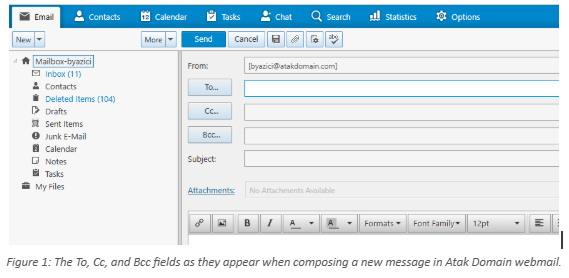
In most webmail clients, including Atak Domain's, the CC and BCC fields sit just below “To” and are collapsed by default; clicking the field label expands them so you can add addresses without cluttering the compose window for messages that only need a “To” recipient.
Keeping a manager or teammate updated on a conversation they need visibility into, without expecting them to respond.
Introducing two people to each other so they can continue the conversation directly, with both addresses visible.
Looping in additional staff on an existing thread when their involvement is expected to become active soon.
Sharing information transparently within a small, trusted group, such as a project team or a family matter with relatives who already know each other.
Sending a newsletter, announcement, or update to a large list where recipients do not know each other.
Protecting the privacy of job candidates or references when forwarding resumes or introductions.
Messaging customers or clients where addresses should never be exposed to other customers.
Coordinating across teams that do not need to see each other's internal contacts.
Handling sensitive or confidential matters where recipient privacy is a priority.
Reading the definitions is one thing; applying them under real workplace pressure is another. The scenarios below reflect situations that come up constantly in day-to-day business email.
A sales rep emails a prospect with a proposal and CCs their manager. The manager doesn't need to reply, but staying visible on the thread means they can step in immediately if the deal stalls, without asking the rep for a status update.
An HR manager forwards a candidate's resume to three department heads for feedback. BCC keeps each department head from seeing who else was consulted, protecting both the candidate's process and internal hiring discussions.
A small business owner sends a monthly update to 400 subscribers. BCC (or a proper mailing list tool) keeps every customer's email address private, rather than exposing an entire customer list to itself.
A project manager sends a status update to the design team in “To” and CCs the engineering lead, who needs visibility but isn't expected to weigh in unless something affects their team's timeline.
A manager emails legal counsel about a disciplinary issue and BCCs a second HR colleague for record-keeping, without revealing to legal that anyone else is aware of the situation.
An operations lead introduces a new vendor contact to their finance team using CC, so both sides can see each other's addresses and continue the conversation directly without the original sender in the middle.
A company sends an invitation to 150 external partners for an event. BCC prevents 150 unrelated companies from seeing each other's contact details in one shared thread — a mistake that has caused real data-exposure complaints.
Forgetting to BCC a large group, exposing every recipient's email address to everyone else on the list.
Using “Reply All” on a CC'd thread without checking who is actually still relevant to the conversation.
CC'ing a manager as a passive-aggressive move to pressure a colleague, rather than for genuine visibility.
Over-CC'ing entire teams on every message, burying important emails under low-relevance notifications.
Accidentally placing a BCC recipient in the CC or To field, which defeats the purpose of the BCC entirely.
Assuming BCC hides the sender's own address — it doesn't; only other recipients are hidden from each other.
Adding someone to CC without telling them, so they're surprised to see themselves included when they open the thread.
Using CC where BCC was clearly the safer or more professional choice, especially with external contacts.
Leaving old CC'd recipients on a thread long after their involvement in the topic has ended.
Not double-checking the recipient list before hitting send on a sensitive or high-stakes email.
Given how long email has existed, it's reasonable to assume this mistake would have disappeared by now. It hasn't. If anything, the rise of AI-assisted email drafting and CRM tools that auto-populate recipient fields has made it easier to send a message to a large group without noticing that CC, not BCC, was selected by default.
The most common version of this mistake in 2026 looks the same as it always has: an internal team meant to send an update to a long external distribution list uses CC instead of BCC, and every external recipient suddenly has every other recipient's email address. Data-protection regulations such as GDPR and Turkey's KVKK treat this kind of accidental exposure as a genuine privacy incident, not a harmless slip, and it can carry real regulatory and reputational consequences for a business.
The fix has not changed either: before sending to any group where recipients don't already know each other, pause and confirm which field their addresses are actually sitting in.
Stick to one topic per email so recipients can act on it and file it away without digging through unrelated points.
Use CC to inform, not to apply pressure; if a message reads like an ultimatum aimed at a colleague, CC'ing their boss usually makes things worse, not better.
Keep distribution lists current; remove people from a CC line once their involvement in that specific topic is finished.
Default to BCC for any list where recipients are external, unrelated, or numerous enough that no one needs to see the full list.
Write a subject line that reflects the actual content, so CC'd recipients can judge relevance without opening the message.
Avoid “Reply All” unless your response is genuinely useful to everyone on the original list.
| Do | Don't |
| Use CC to keep someone informed on a topic they're expected to care about | Use CC as a way to pressure or call out a colleague |
| Use CC to introduce two contacts so they can continue directly | CC someone without any context about why they're included |
| Use BCC for any large or external distribution list | Rely on CC for newsletters or mass announcements |
| Double-check the recipient field before sending anything sensitive | Hit “Reply All” automatically out of habit |
| Remove inactive participants from long-running CC threads | Leave people CC'd indefinitely after their part is done |
Click “Cc” or “Bcc” on the right side of the “To” field on desktop, or tap the arrow next to “To” on mobile to reveal both fields.
The CC field appears directly under “To” by default. BCC is hidden until you open the “Options” tab in a new message and click “Bcc” to add it to the compose window.
On the web, CC and BCC appear to the right of the “To” field. In the mobile app, tap the arrow beneath “To” to expand both fields.
As shown in Figure 1 above, clicking “To...” expands the compose window to reveal “Cc...” and “Bcc...” directly beneath it, so you can add either field in a single click without leaving the message you're writing.
To, CC, and BCC control who sees a message. A separate set of technical standards controls whether that message is trusted, delivered, and read correctly in the first place. A quick overview:
SPF (Sender Policy Framework): a DNS record that tells receiving servers which mail servers are allowed to send email for your domain.
DKIM (DomainKeys Identified Mail): a digital signature added to outgoing mail that proves it wasn't altered in transit.
DMARC: a policy that tells receiving servers what to do with messages that fail SPF or DKIM checks, and reports the results back to you.
SMTP (Simple Mail Transfer Protocol): the protocol responsible for actually sending your email from your server to the recipient's server.
IMAP (Internet Message Access Protocol): the protocol that keeps your inbox synced across every device by storing messages on the server rather than downloading them locally.
If your business sends a meaningful volume of CC'd or BCC'd email, particularly newsletters and customer updates, these four standards are what keep that mail out of spam folders and protect your domain from being spoofed.
CC stands for carbon copy. It sends a full copy of an email to someone who should stay informed, and everyone on the To and CC lines can see each other's addresses.
BCC stands for blind carbon copy. It sends a copy of the email privately, hiding that recipient's address from everyone else on the message.
CC makes every recipient's address visible to everyone else on the email. BCC hides each BCC'd recipient's address from all other recipients, while the sender's own address stays visible either way.
No. CC is entirely optional. Use it only when someone genuinely needs visibility into a conversation without being the primary recipient.
Use BCC whenever recipients don't know each other, don't need to see the full list, or when exposing their addresses could create a privacy issue — newsletters and large external lists are the clearest examples.
No. Recipients in the BCC field cannot see each other's addresses. They can only see their own address, the sender, and anyone listed in To or CC.
No. BCC only hides the addresses of other BCC'd recipients from one another. The sender's address remains visible to everyone who receives the message.
Not always. BCC is useful for privacy and large lists, but overusing it in small, trusted teams can create unnecessary confusion or feel evasive. Match the field to the context.
It depends on context. Using BCC to protect recipient privacy on a large list is standard, accepted practice. Secretly including someone to monitor a conversation without the primary recipients' knowledge raises different ethical questions and should be handled carefully.
Use CC when you want every recipient to see who else is included. Use BCC when you want recipients included without exposing their addresses to one another.
Use BCC, a dedicated mailing list, or a professional email delivery service designed for bulk sending, all of which prevent recipients from seeing each other's addresses.
Yes. Regulations such as CAN-SPAM in the United States, GDPR in the EU, and KVKK in Turkey generally require consent and an opt-out option for marketing email, and treat accidental address exposure as a data-protection issue worth taking seriously.
The main risk is exposing every recipient's address to the entire list, which can lead to privacy complaints, spam, and in some cases regulatory penalties.
Yes. An email can include To, CC, and BCC recipients at the same time; each field behaves independently of the others.
No. CC signals that someone should stay informed, not that a reply is expected. Replies are generally expected from recipients in the To field.
To, CC, and BCC exist to answer one simple question: who needs to see this, and who needs to know who else sees it? “To” is for people who need to act. CC keeps a conversation transparent for people who should stay informed. BCC protects privacy when transparency isn't the goal, or isn't appropriate.
Getting this right consistently isn't about memorizing rules; it's about pausing for a few seconds before sending anything to more than one person and asking whether every recipient should see who else is on the list. That one habit prevents most of the mistakes covered in this guide.
If your team is still juggling personal Gmail or Yahoo accounts for business correspondence, a proper corporate email address on your own domain makes CC, BCC, and everyday professional communication look, and function, the way clients expect. Set up corporate email hosting on your own domain, with SPF, DKIM, and DMARC configured from day one, and give every team member an inbox that reflects your business rather than a free webmail provider.