


Who Owns a Domain? How to Check with WHOIS and RDAP?
03.08.2026
Registering a .com domain is genuinely simple. It takes under five minutes and requires no documents, no eligibility check, no waiting. But there are a few things worth knowing before you click through: how to spot a premium domain, why registration length matters, what add-ons are worth considering, and how to make sure you never accidentally lose the domain you just registered.
This guide walks through the exact steps using the Atak Domain interface, with real screenshots of each screen.
>> Search Your .com Domain
$7.99/year · 61% off · No documents · Free Whois privacy · Real-time activation
→ https://www.atakdomain.com/en/domain-registration/com
Step 1: Go to the Atak Domain Homepage
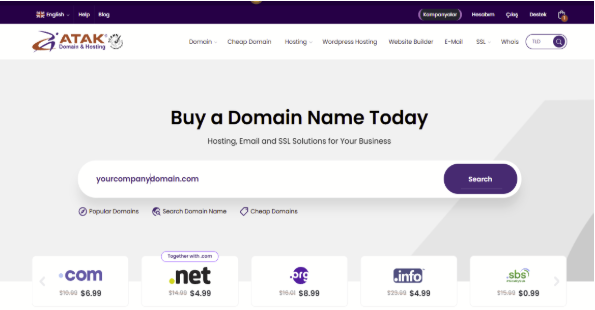
Atak Domain homepage (EN) — Buy a Domain Name Today · .com $6.99, .net $4.99, .org $8.99, .info $4.99
💡 Shortcut
Go directly to the .com registration page: atakdomain.com/en/domain-registration/com
This loads the search interface pre-filtered for .com, so you see .com availability and pricing immediately.
Step 2: Search for Your Domain Name
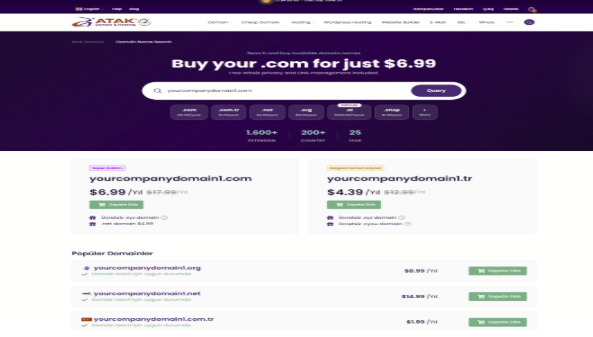
Domain Name Search page — .com $6.99/yr, free Whois privacy, 1,600+ extensions, 200+ countries
• Available domains: shown with a green "Add to Cart" button and the current price
• Taken domains: "Taken" status shown; a Whois lookup option may appear
• Premium domains: price significantly above standard registration — check the renewal fee too, as it will also be elevated
• Suggested alternatives: .tr, .net, .org, .ai, .shop and other extensions shown with their prices below the main result
⚠️ Premium Domain Warning
If the price shown is far above the standard $6.99, the domain is in the premium tier.
Both registration and renewal fees are elevated for premium domains. Calculate the 5-year total before committing.
Consider a variation or a different word combination at standard pricing.
If your preferred name is taken:
try variations. "yourbrand.com" gone? Try "getyourbrand.com", "yourbrandapp.com", or "yourbrand.co". Finding a strong variation on .com is almost always better than compromising on the brand name itself.
Step 3: Add to Cart and Set Registration Length
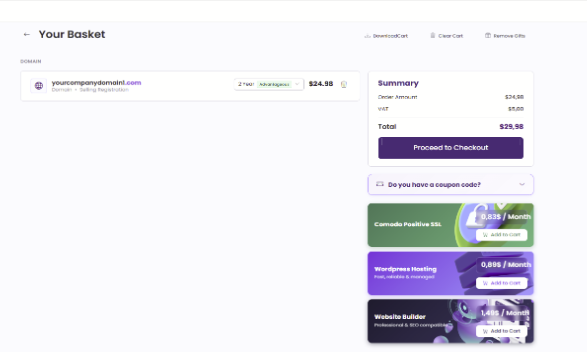
Your Basket — 2-year Advantageous option selected, SSL, WordPress Hosting and Website Builder add-ons
Registration period (1–10 years)
The cart defaults to 2 years with an "Advantageous" label. Longer registration reduces the risk of accidental lapse and sometimes unlocks additional savings. For a brand-critical domain, 2–5 years is a sensible choice. Enable auto-renewal regardless of which period you select.
Add-on services — what appears in the cart
Three add-on offers appear on the right side of the cart:
• Comodo Positive SSL — $0.83/month: Adds HTTPS to your website. If you're building a site on this domain, add it here. Visitors expect the padlock.
• WordPress Hosting — $0.89/month: If you need hosting for this domain, adding it here at the cart stage is cheaper than purchasing separately later.
• Website Builder — $1.49/month: Professional, SEO-ready website templates. A practical option if you want to get online quickly without a developer.
💡 Bundle Tip
Domain + SSL + Hosting purchased together costs less per unit than buying separately.
If you already know you need hosting and email, evaluate the bundle at this stage — not after.
Step 4: Complete Your Order and Pay
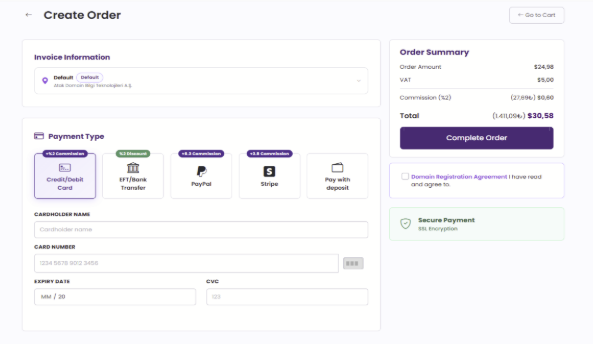
Create Order screen — 5 payment methods, Order Summary with Commission (%2) detail, SSL Encryption badge
Billing details
Select a saved billing profile or add a new address. Keep this accurate — renewal reminders are sent to the contact email on file. If this address changes in the future, update it in your account settings.
Payment methods
Atak Domain accepts five payment methods:
• Credit/Bank Card (+2% fee): Instant processing — domain activates immediately after payment
• Bank Transfer / EFT (2% discount): Lower total cost; domain activates after bank confirmation
• PayPal (+8.3% fee): For international cardholders who prefer PayPal
• Stripe (+3.5% fee): Alternative card payment infrastructure
• Prepaid Balance: Pay from credit you have loaded into your Atak Domain account
💡 Payment Choice
Bank transfer gives you a 2% discount — worth considering if you're registering multiple domains at once.
For speed: credit card is the fastest path. Payment confirmed = domain live.
Step 5: Confirm and Go Live
✅ What to Do Right After Registration
1. Enable auto-renewal immediately — from your account settings. This is the single most important step after registration.
2. Configure DNS — point your nameservers or add an A record to your hosting.
3. Enable DNSSEC — protects against DNS spoofing attacks.
4. Add an SSL certificate — if you did not add one during checkout.
5. Set up business email — yourname@yourdomain.com signals professionalism from day one.
The 5-Step Summary
| # | Step | What happens |
| 1 | Go to the .com registration page | atakdomain.com/en/domain-registration/com |
| 2 | Search your name | Check availability, price, and premium status |
| 3 | Add to cart | Set registration period; review add-ons |
| 4 | Choose payment method | Card = instant; bank transfer = 2% discount |
| 5 | Complete Order | Domain goes live in real time |
Which Extension Should You Choose?
If your preferred .com is available: register it. Full stop.
If it is taken, here is a quick comparison of the most credible alternatives:
| Extension | Best for | When to use it |
| .com | Universal — every industry, every audience | The default for any commercial brand. If available, always .com first. |
| .net | Technical infrastructure, hosting, networks | Strong credibility signal for tech and internet services. |
| .co | Global startups, short brand names | Widely understood as a company abbreviation. Strong for early-stage brands. |
| .io | Developer tools, SaaS, APIs | High credibility in technical and developer communities. |
| .ai | AI-native products | Signals AI focus immediately. Higher cost than .com. |
| .online | Any sector, broad audience | Low cost, universally understood. Good for campaigns or secondary addresses. |
Frequently Asked Questions
❓ Do I need any documents to register a .com domain?
No. .com has no eligibility requirements, documentation requirements, or geographic restrictions. Anyone, anywhere can register a .com immediately. The domain is registered the moment payment clears. Your website goes live after DNS and hosting are configured.
❓ How long can I register a .com for?
1 to 10 years. You choose the period at the cart stage. Longer registration reduces the risk of accidental lapse. Enable auto-renewal regardless of which period you choose.
❓ My preferred name is taken. What are my options?
Try word variations: add a prefix (get, try, use, my) or suffix (app, hq, co) to your preferred name. If the brand name is fixed, consider .co, .io, or .net as alternatives. Before choosing a different extension, exhaust the .com variation options — a distinctive brand on a slightly different .com is almost always stronger than the same name on a secondary extension.
❓ How quickly does the domain go live after payment?
For credit card and prepaid balance payments: real-time — typically within seconds. For bank transfer / EFT payments: the domain activates after bank confirmation, which depends on the bank's processing time.
❓ What other services will I need after registering a domain?
To build a site: hosting. To secure it: an SSL certificate. To communicate professionally: business email. All three are available as add-ons during checkout or separately.
❓ Is Whois privacy included?
Yes. Atak Domain includes free Whois privacy with .com registrations. Your personal contact details are not exposed in public Whois lookups.
❓ What happens if I forget to renew my domain?
After expiry, a grace period begins. After that, a redemption period applies — recovery is still possible but at a significantly higher cost than standard renewal. After the redemption window, the domain is released publicly. Enable auto-renewal immediately after registering to prevent this chain of events entirely.
❓ Can I transfer a .com domain I already own to Atak Domain?
Yes. Domain transfers require an EPP (auth code) from your current registrar. Most newly registered .com domains cannot be transferred for the first 60 days. The transfer process at Atak Domain extends the domain by one year. See the full domain price list for transfer pricing.
One Last Thing: Protect What You Just Registered
The registration itself takes five minutes. Keeping the domain permanently takes one step: enable auto-renewal before you close the tab.
Every year, thousands of domains lapse because the renewal reminder went to an old email address, a responsible person changed roles, or auto-renewal was simply never turned on. None of these are expensive problems to prevent. All of them are expensive problems to fix.
Your .com May Still Be Available — Check Now
$6.99/year · 61% off · No documents · Free Whois privacy · Real-time activation
Domain & Technology Writer
Atak Domain
Creates content on corporate communication infrastructure, email security, and digital brand identity.